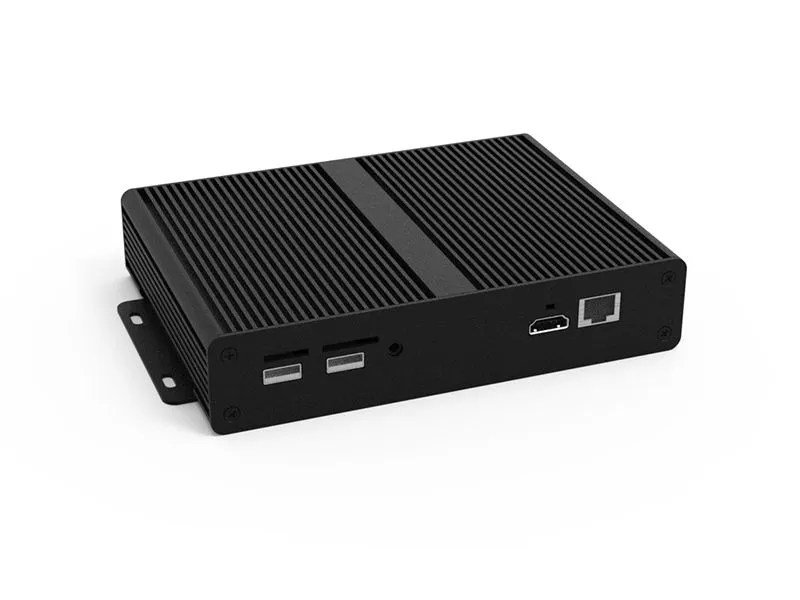
You’ve got a big, beautiful TV, a fast internet connection, and subscriptions to all the best streaming services. So why are you still fumbling through clunky smart TV menus or waiting for your game console to slowly load Netflix? The answer might lie in a dedicated device: a standalone media player or streamer. These unsung heroes of home entertainment don't just stream; they elevate your entire viewing and listening experience, often outperforming built-in smart TV platforms or general-purpose devices.
Think of it this way: a standalone media player is like a high-performance sports car compared to your family sedan (your smart TV). Both get you from A to B, but one offers a smoother, faster, and more thrilling ride, complete with specialized features designed for peak performance. If streaming is a cornerstone of your daily entertainment, or you’re craving better content integration and faster performance, it's time to consider going dedicated.
At a glance: Why a Standalone Media Player Matters
- Superior Performance: Faster processing, quicker app launches, and smoother navigation than most smart TVs or consoles.
- Wider Feature Set: Better support for 4K HDR (Dolby Vision, HDR10+) and advanced audio (Dolby Atmos).
- Enhanced Usability: Intuitive, content-centric interfaces with robust cross-app search and personalized recommendations.
- Future-Proofing: Faster software and app updates, ensuring compatibility with the latest streaming technologies.
- Local Media Playback: Many models can play your personal videos, photos, and music directly from USB drives or SD cards.
- Portability: Take your entire streaming ecosystem with you when you travel.
- Ecosystem Flexibility: Choose a device that aligns with your preferred tech universe (Google, Apple, Roku, Amazon) or one that's refreshingly agnostic.
Why Settle for Less? The Case for Dedicated Devices
Let's be honest: while smart TVs are ubiquitous, their integrated streaming platforms can often feel like an afterthought. They might struggle with slow processors, outdated operating systems, or a lack of support for cutting-edge audio and video formats. Game consoles, while powerful, are optimized for gaming, making their streaming interfaces feel secondary and less refined. Even Blu-ray players, for all their optical disc prowess, often come with basic, sluggish streaming apps.
This is where standalone media players and streamers truly shine. They're purpose-built, designed from the ground up to deliver the best possible streaming and local media playback experience. This focus means they often boast more powerful processors, dedicated streaming hardware, and receive faster, more consistent app updates directly from the platform developer. You’ll notice the difference immediately: less buffering, snappier menu navigation, and a more vibrant, immersive picture and sound. For a deeper dive into the world of dedicated devices, you might want to check out our standalone guide.
What Makes a Top-Tier Media Player? Key Features to Prioritize
When you’re sifting through the options, a few critical features separate the good from the truly great. These are the non-negotiables if you want a premium experience:
Visual Fidelity: 4K, HDR, and Beyond
High-quality video starts with resolution and color.
- 4K Ultra HD: This is the baseline for modern viewing. Ensure your player supports native 4K output to make the most of your compatible TV.
- High Dynamic Range (HDR): This is arguably more impactful than resolution alone, offering a wider range of colors and brighter, more realistic contrast. Look for support for:
- Dolby Vision: Often considered the premium HDR format, offering dynamic metadata that adjusts brightness and color scene-by-scene.
- HDR10+: Samsung and Amazon's answer to Dolby Vision, also using dynamic metadata.
- HDR10: The universal, static HDR standard.
- HLG (Hybrid Log-Gamma): Primarily used for broadcast TV.
Audio Immersion: Dolby Atmos and More
Great visuals deserve equally impressive sound.
- Dolby Atmos: This object-based audio format creates a truly immersive, three-dimensional soundscape, especially with compatible sound systems. Many top-tier streamers can pass through Dolby Atmos audio to your receiver or soundbar.
- DTS:X: Another object-based audio format, though less common in streaming services than Atmos.
- Passthrough Capabilities: Ensure the player can "passthrough" these advanced audio signals to your A/V receiver or soundbar for decoding.
Local Playback: Your Personal Media Library
One of the standout advantages of many standalone media players, particularly those focused on playback, is their ability to handle your own files.
- Storage Connectivity: Look for USB ports (often supporting drives up to 8TB or more) and MicroSD/SD card slots (up to 1TB) for playing content directly.
- Broad Format Support: A versatile player should handle common video codecs like H.265/HEVC (for efficient 4K video) and H.264/AVC, as well as container formats like MP4 and MKV. For audio, MP3 and FLAC are crucial, and for photos, JPG is standard.
- Playback Features: Essential functionalities include auto-play, resume playback (picking up where you left off), and looping (great for presentations or background video). Some even offer digital signage capabilities for commercial use.
Connectivity and Processing Power
- HDMI Output: The standard for connecting to your TV. Some older units might still offer Analog AV outputs.
- Ethernet Port: Crucial for the most stable and highest-bandwidth streaming, especially for 4K content.
- Wi-Fi Standards: Look for at least Wi-Fi 5 (802.11ac), with Wi-Fi 6 (802.11ax) or Wi-Fi 6E offering even faster, more reliable wireless performance.
- Fast Processor & RAM: This dictates how snappy the interface feels, how quickly apps load, and how smoothly you can switch between tasks. Don't underestimate the importance of a responsive user experience.
User Experience: Interface, Search, and Integration
A powerful device is only as good as its usability.
- Content-Centric Interface: The best players prioritize the content itself, not just the app logos.
- Superior Cross-Service Search: This is a game-changer, allowing you to search for a movie or show across all your subscribed services simultaneously, telling you where to watch it, buy it, or rent it at the best price.
- Customizable Layouts: The ability to personalize your home screen and quickly access your favorite apps.
- Ecosystem Agnostic Recommendations: Ideally, recommendations shouldn't heavily favor one streaming service (like Amazon's Prime Video bias).
Navigating the Landscape: Top Picks & Key Players
The market for standalone media players and streamers is robust, with several excellent options catering to different needs and budgets. Here’s a look at some of the leaders, leveraging expert recommendations from sources like Wirecutter and common product trends on platforms like Amazon.
The All-Around Champion: Google TV Streamer (4K)
Wirecutter's top pick, the Google TV Streamer (4K) (often referring to devices like the Chromecast with Google TV 4K), sets a high bar. Priced around $100, this device delivers 4K HDR with full Dolby Vision and Dolby Atmos support.
Why it stands out:
- Google TV Interface: Known for its fast, reliable, and intuitive content organization, it excels at cross-service search without proprietary bias. It genuinely helps you discover content, not just apps.
- Smart Home Hub: It cleverly doubles as a smart-home hub, compatible with Google Home, Matter, and Matter-over-Thread, making it a central point for your connected home.
- Connectivity: Features a Bluetooth voice remote, USB-C input, a gigabit-capable Ethernet port (often via an adapter), and 32GB of internal storage.
- Design: Sleek and minimalist, with a handy remote finder button.
Considerations: It uses Wi-Fi 5 protocol and is naturally more aligned with the Android/Google ecosystem, meaning no native Alexa, Siri, or AirPlay 2 support.
The Budget-Friendly Powerhouse: Onn Google TV 4K Pro
Exclusively available at Walmart, the Onn Google TV 4K Pro is Wirecutter's budget pick at a surprising $50. It provides a reliable and zippy Google TV experience without breaking the bank.
Why it's a great value:
- 4K and Wi-Fi 6: Supports 4K resolution and the faster Wi-Fi 6 standard.
- Hands-Free Control: Includes hands-free voice control ("Hey Google") and a remote finder.
- Connectivity: Features an Ethernet port (though not gigabit-capable) and a useful USB-A 3.0 port for external storage or peripherals. It even comes with an HDMI cable.
- Performance: Despite a less robust physical design and a slightly less powerful processor/RAM than premium models, it offers surprisingly zippy performance for its price point.
For Roku Enthusiasts: Roku Streaming Stick 4K
If you're already a fan of Roku's straightforward, app-centric approach, the Roku Streaming Stick 4K is an excellent choice.
Why Roku users love it:
- Roku OS: Provides a simple, highly customizable interface that prioritizes quick access to apps.
- HDR Support: Supports 4K HDR across all major formats (HDR10, HDR10+, Dolby Vision, HLG) and can pass Dolby Atmos audio.
- AirPlay 2: A big plus for Apple users, allowing seamless casting from iOS devices.
- Form Factor: Plugs directly into an HDMI input, powered via USB, making for a clean setup. Includes an RF voice remote.
Considerations: Its home screen is less effective at cross-platform content organization compared to Google TV. It operates on Wi-Fi 802.11ac and lacks USB storage or an Ethernet port, making it less ideal for local media playback or maximum streaming stability. Its performance can be slower than larger, more powerful streamers.
Other Notable Contenders
The market is full of strong players, each with its unique strengths:
- Roku Ultra (2024): Roku's premium offering, with minor improvements like Wi-Fi 6 and an upgraded processor. While solid, it's often considered sluggish compared to the fluidity of Google TV Streamer (4K).
- Apple TV 4K (3rd gen): For those deeply embedded in the Apple ecosystem, the Apple TV 4K offers zippy processing, an intuitive UI, and seamless integration with Apple services and AirPlay 2. It’s a premium experience but comes with a higher price tag and an Apple-centric bias.
- Amazon Fire TV Stick 4K/Max/Cube (2023): Amazon's offerings are powerful, often incorporating generative AI for voice search and featuring cutting-edge Wi-Fi 6E (Max/Cube). The Fire TV Cube even offers hands-free operation. However, they heavily prioritize Prime Video content and feature ads on the home screen, which can be a turn-off for some users.
- Nvidia Shield TV: Once the undisputed king of powerful Android TV devices, known for its gaming capabilities and excellent AI upscaling. While still very capable, it's an older device that lacks the updated Google TV interface and the same level of robust content integration as newer models.
- TiVo Stream 4K/Sling's AirTV Mini: These Android TV-based devices offer specialized integrations, particularly for live TV services. They might offer a less seamless or general-purpose streaming experience compared to the mainstream options, but could be perfect for a specific niche.
Amazon's Product Landscape: What to Expect
On platforms like Amazon, you'll find a wide array of standalone media players. Many support 4K Ultra-HD and the efficient H.265/HEVC codec, along with numerous other media formats. Common features across the board include playback from USB drives and MicroSD/SD cards, HDMI and analog AV outputs, and user-friendly functions like auto-play, resume, and looping. Some are even specifically designed for digital signage applications, underscoring their versatility beyond typical home entertainment. Storage support is often generous, with devices handling USB drives up to 8TB and MicroSD cards up to 1TB. When browsing, keep an eye out for "Overall Pick" badges, which indicate highly-rated products (4+ stars) that are purchased often and have low return rates.
Choosing Your Champion: A Decision Framework
With so many excellent choices, how do you pick the right standalone media player or streamer for your home? Ask yourself these questions:
- What's Your Budget? From $50 to $200+, there's a device for every wallet. Prioritize features based on what you can spend.
- Which Ecosystem Do You Prefer?
- Google TV: Excellent for content discovery, cross-app search, and smart home integration (Google Home, Matter).
- Roku: Simple, app-centric, highly customizable, and great for AirPlay 2.
- Apple TV: Best for Apple users, premium UI, tight ecosystem integration.
- Amazon Fire TV: Best for Prime Video users, Alexa integration, hands-free options.
- Do You Need Local Media Playback? If playing videos, photos, or music from USB drives or SD cards is crucial, prioritize devices with robust port options and wide format support.
- Are Advanced Features a Must? If you have a high-end sound system or a premium TV, ensure your player supports Dolby Vision, HDR10+, and Dolby Atmos. A stable Ethernet connection is vital for uncompressed 4K streams.
- Smart Home Integration? If you want your streamer to also act as a smart home hub, Google TV devices are strong contenders.
- Performance Priority? If you despise lag and value a zippy, responsive interface above all else, lean towards models with more powerful processors and ample RAM (like the Google TV Streamer 4K or Apple TV 4K).
Beyond the Basics: Addressing Common Questions
"My smart TV has apps. Do I really need another device?"
In most cases, yes, for a superior experience. Smart TV apps are often slower, receive less frequent updates, and may lack support for newer video/audio formats. A standalone streamer will almost always provide a snappier interface, better content discovery, and more reliable performance. Think of it as upgrading from a basic computer to a specialized workstation for your entertainment.
"Are standalone media players difficult to set up?"
Not at all! Most modern streamers simply plug into an HDMI port on your TV, connect to power, and then guide you through a quick Wi-Fi setup. You'll sign into your preferred streaming services, and you're good to go. The entire process typically takes less than 15-20 minutes.
"Can I use these devices to play games?"
While some devices like the Nvidia Shield TV and Apple TV 4K have decent gaming capabilities, and even Google TV allows for some casual Android games, they are not designed to replace dedicated gaming consoles. Expect more casual gaming experiences rather than AAA titles.
"Will a streamer make my non-4K TV into a 4K TV?"
No. A 4K streamer will only output in 4K if your TV is 4K compatible. If you have an HD TV, the streamer will downscale the content to match your TV's resolution. However, the improved interface and features will still enhance your experience.
Elevate Your Entertainment
The world of standalone media players and streamers is all about choice, performance, and putting you in control of your entertainment experience. Whether you're chasing the ultimate 4K HDR and Dolby Atmos immersion, looking for a seamless way to play your local media library, or simply tired of sluggish interfaces, there's a dedicated device out there ready to transform your living room. By understanding the key features and aligning them with your personal preferences and budget, you can unlock a streaming and playback experience that truly stands alone.